
We are excited to announce ImagePrint 1.53, the latest update that improves document creation, image editing, and layout design. This release introduces a cleaner interface, smarter customization options, improved high-resolution support, and powerful new alignment features that help users work faster and more accurately.
ImagePrint 1.53 focuses on making everyday tasks easier. You can now customize your workspace, create documents with your preferred settings, reuse image dimensions quickly, and align objects with greater precision.
Create a Cleaner Workspace with Compact Mode
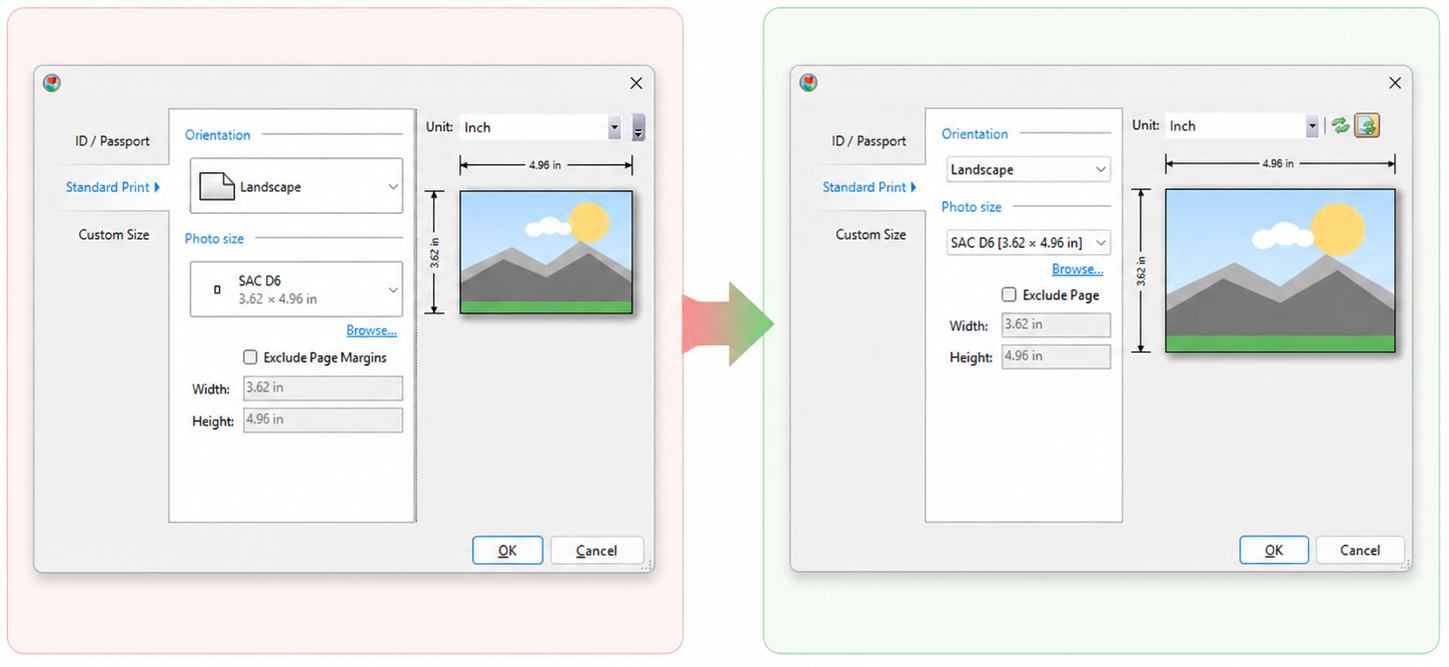
ImagePrint 1.53 introduces a new Compact Mode that gives you more space to work and creates a cleaner interface.
You can enable Compact Mode from:
File > Options > Compact Mode

When you turn on Compact Mode, ImagePrint displays dropdown controls on a single line and removes the icons. This reduces visual clutter and creates a simpler workspace, making it easier to focus on your document and design tasks.
Compact Mode works especially well for users who prefer a minimal interface or need more room when working with complex layouts.
Choose Your Default Page Size for New Documents
The new Default Page Size option saves time when creating new documents.
You can find this setting under:
File > Options > Default page size

After you select a page size, ImagePrint automatically applies it whenever you create a new document. You no longer need to manually select the same page dimensions every time you start a project.
This improvement helps users maintain consistent document settings and speeds up workflows for frequently used formats.
Save and Reuse Image Sizes Faster
ImagePrint 1.53 improves the Image Size workflow by remembering your previous selections.
When you open the Image Size dialog, ImagePrint restores your last-used settings automatically. The application saves your selections in the registry, so your preferred image dimensions remain available between sessions.
The update also adds applied image sizes to the recent sizes list. You can quickly reuse commonly used dimensions without entering them again, making image preparation faster and more efficient.
Improved High-DPI and Resolution Support
ImagePrint 1.53 delivers a better experience on modern displays with improved resolution handling.
The application now adjusts button images and input fields automatically based on your screen resolution. This creates a more consistent interface across different monitors, scaling settings, and high-resolution displays.
Whether you use a standard monitor or a high-DPI screen, ImagePrint adapts to provide clearer controls and improved usability.
Align Objects More Precisely with Snap Shapes to Distances
ImagePrint 1.53 adds a powerful new layout feature: Snap Shapes to Distances.

This feature allows shapes to snap based on measured distances, giving you more accurate control over spacing and alignment. ImagePrint automatically helps position objects using consistent spacing and distance increments. The distance between the shapes is displayed in display unit.
You can create cleaner layouts without manually adjusting every object. The new snapping system makes it easier to organize photos and build professional-looking compositions.
With distance-based snapping, ImagePrint helps you achieve precise alignment faster while reducing repetitive adjustments.
A Faster and More Precise ImagePrint Experience
ImagePrint 1.53 brings meaningful improvements that enhance productivity and usability. The new Compact Mode creates a cleaner workspace, Default Page Size simplifies document creation, Image Size improvements save time, and enhanced resolution support improves the overall interface experience.
The new Snap Shapes to Distances feature takes layout editing further by making object positioning faster and more accurate.

